
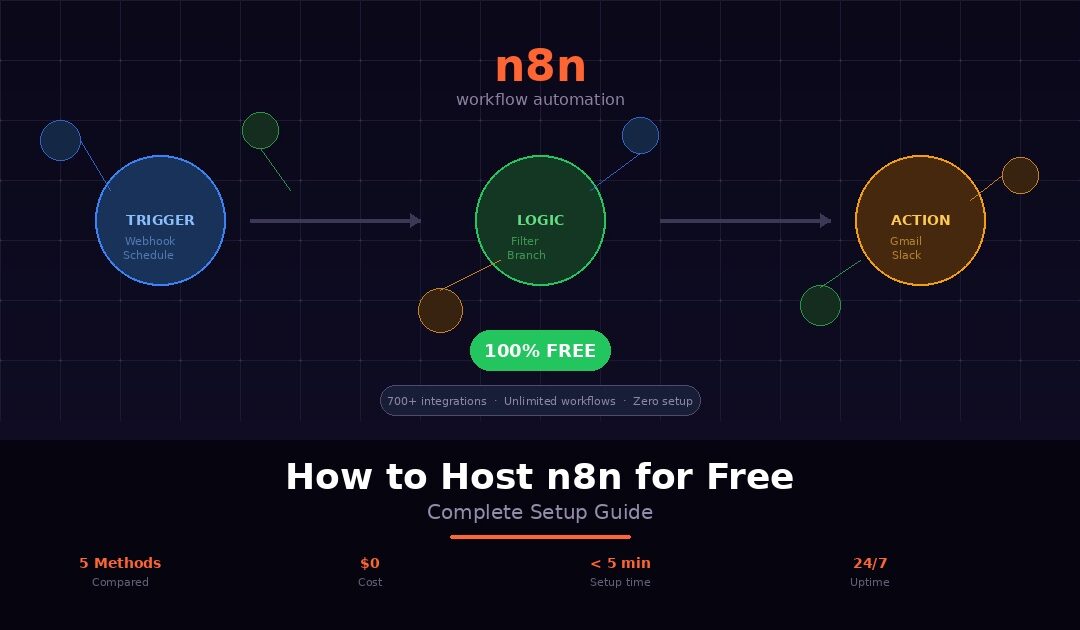
n8n is one of the most powerful workflow automation tools available today. It connects over 700 apps and services, supports custom code and webhooks, and handles complex branching logic. You can build automations that rival Zapier and Make without the per-task pricing. Those platforms get expensive the moment your workflows start running at any real volume. If you have ever paid $20 or more per month for an automation tool and thought there has to be a better way, n8n is it.
The challenge is getting it running without a recurring bill. n8n’s own cloud platform starts at $24 per month for 2,500 executions. That is fair pricing for a managed service. But for someone who just wants to automate a handful of workflows or test ideas, a monthly subscription feels premature. The alternative is self-hosting the open-source community edition. It costs nothing to use, but you have to set up and maintain your own server. For developers, that is a reasonable trade-off. For everyone else, it is a barrier that stops them before they start.
The good news is that there are several legitimate ways to host n8n for free in 2026. Some require Docker knowledge and server management. Some use free-tier cloud platforms with varying limitations. And one method requires zero technical setup at all, giving you a fully managed, cloud-hosted n8n instance running in under five minutes without installing anything on your computer.
This guide covers every available method and compares them honestly with real pros, cons, and hidden catches. It walks you through the fastest path to a working n8n instance without spending a dollar. Whether you are a developer who wants full control or a no-code builder who wants simplicity, there is a free option here that fits. Business owners who just want automations running reliably will find their answer too.
What Is n8n and Why Does It Cost Money?
n8n (pronounced “n-eight-n”) is an open-source workflow automation platform. If you have used Zapier, Make (formerly Integromat), or IFTTT, n8n does the same thing: it connects apps, moves data between them, and automates tasks that would otherwise eat your time. The difference is that n8n gives you significantly more power and flexibility. You build workflows visually by dragging nodes onto a canvas and connecting them. Each node represents an action. Pull data from a Google Sheet, send an email via Gmail, post a message to Slack, call a custom API, run JavaScript code, or branch logic based on conditions. With over 700 built-in integrations and the ability to connect to any service with an API, the range is enormous.
n8n operates under a “fair-code” license. The community edition is free to download, use, and self-host. You pay nothing for the software itself. This is what separates n8n from Zapier and Make, which charge based on how many tasks or operations your workflows execute each month. With n8n, your executions are unlimited on the self-hosted version. No per-task billing, no throttling, no surprise overages.
So why does it cost money in practice? Because the software needs somewhere to run. n8n Cloud is the fully managed service operated by the n8n team. Plans start at $24 per month for 2,500 executions. They handle the server, the updates, the backups, and the SSL. You just log in and build workflows. If you self-host, the software is free but you need infrastructure. That means a server, a domain, Docker, a reverse proxy, and SSL certificates. You also take on the ongoing maintenance that comes with running any production service yourself.
This creates two paths to running n8n for free. The first path is self-hosting. You install n8n on your own hardware or a free-tier cloud server and manage everything yourself. The second path is managed hosting. A hosting provider runs the infrastructure for you and offers a free tier as part of their platform. Webhost365 offers exactly this for customers on any paid hosting plan.
Both paths have trade-offs. Self-hosting gives you full control but demands technical knowledge. Managed hosting removes the complexity but may come with execution limits or require an existing hosting account. The right choice depends on your technical comfort level and what you plan to automate.
Let us look at every option available, starting with the most technical and ending with the simplest.
5 Ways to Host n8n for Free
Not all free methods are equal. Some require Docker knowledge and server management skills. Others give you a running instance in minutes with zero configuration. Here are all five options, ranked from most technical to least technical, with honest pros and cons for each.
Method 1: Self-Host Locally with Docker
The fastest way to get n8n running on your own machine is through Docker. If you have Docker Desktop installed on your computer (available for Windows, Mac, and Linux), you can launch a working n8n instance with a single command.
Open your terminal and run:
docker run -it --rm --name n8n -p 5678:5678 -v n8n_data:/home/node/.n8n n8nio/n8n
Docker pulls the official n8n image, starts the container, and maps port 5678 to your local machine. Once the container is running, open your browser and go to http://localhost:5678. You will see the n8n welcome screen. Create your account, and you are inside the workflow editor, ready to start building automations. The entire process takes under five minutes if Docker is already installed.
The -v n8n_data:/home/node/.n8n part of the command creates a persistent volume so your workflows, credentials, and settings survive container restarts. Without it, everything resets every time you stop the container.
This method is completely free. No account signups, no credit cards, no cloud services involved. You are running n8n entirely on your own hardware.
However, there are significant limitations. Your workflows only run while your computer is on and Docker is active. The moment your laptop goes to sleep, shuts down, or loses power, every scheduled workflow stops executing. Webhooks from external services like Stripe, GitHub, or form builders cannot reach localhost, which means any automation triggered by an outside event will not work. There is no SSL, no custom domain, and no way for anyone else on your team to access the instance remotely.
Local Docker hosting is excellent for one thing: learning. If you want to explore the n8n interface, test workflow logic, and experiment with nodes, this is the lowest-friction starting point available. Learn how automations work before committing to a permanent setup. Build your workflows locally and validate the logic. When you are ready to run them in production, deploy to one of the cloud-based methods below.
Best for: Learning n8n, testing workflow logic, and prototyping automations before deploying them to a permanent environment.
Method 2: Self-Host on a Free-Tier Cloud VPS
If you need n8n running 24/7 in the cloud with working webhooks and external triggers, self-hosting on a free-tier virtual private server is the most common approach. Three major cloud providers offer VPS instances at no cost, though the terms and limitations vary significantly.
Google Cloud Platform offers an e2-micro instance with 0.25 vCPU, 1GB RAM, and 30GB standard storage under their Always Free tier. This does not expire after 12 months. As long as you stay within the free usage limits, you will not receive a bill. The instance is underpowered for heavy workflows but handles lightweight automations comfortably.
Oracle Cloud offers the most generous free tier available. Their Always Free ARM-based instances give you up to 4 OCPUs and 24GB RAM with 200GB of block storage. This is more than enough to run n8n alongside a PostgreSQL database with room to spare. The catch is that Oracle’s signup process rejects many applicants, and availability of free-tier resources varies by region.
AWS Free Tier provides a t2.micro instance with 1 vCPU, 1GB RAM, and 30GB of EBS storage. This sounds competitive, but there is a critical detail: the AWS free tier expires after 12 months. After that, the same instance costs roughly $8 to $10 per month. Many people set up n8n on AWS, forget about the expiration, and find unexpected charges on their credit card a year later.
The general setup process for any of these providers follows the same steps. You create a cloud account, which requires a credit card for identity verification even though you will not be charged within free limits. You spin up a free-tier VM and SSH into it. You install Docker and Docker Compose. You create a docker-compose.yml file with n8n and optionally PostgreSQL for more reliable data storage than the default SQLite. You install Nginx as a reverse proxy to handle HTTPS traffic. You point a domain or subdomain to your server’s IP address. And you configure SSL with Let’s Encrypt using Certbot so your instance runs over HTTPS, which is required for webhooks and OAuth authentication with most third-party services.
Each of those steps is well documented individually, but stringing them together into a working production setup requires familiarity with Linux command line, SSH, Docker networking, DNS configuration, and web server management. If any single step goes wrong, a misconfigured Nginx rule, a failed SSL renewal, a Docker container that crashes silently at 3am, your automations stop running and you are the only person who can fix it.
You are also responsible for ongoing maintenance. n8n releases updates regularly. Docker images need to be pulled and containers restarted. The operating system needs security patches. Backups need to be configured manually or scripted. If your free-tier instance runs out of disk space, memory, or CPU, you will need to troubleshoot and optimise without any support team to call.
That said, this method gives you full control over your n8n environment. You own the server, you control the configuration, you decide when to update, and you can install any additional tools or services alongside n8n. For developers and system administrators who enjoy this kind of work, a free-tier VPS is a genuinely excellent way to run n8n at zero cost indefinitely, particularly on Oracle Cloud or Google Cloud where the free tier does not expire.
Best for: Developers and technically comfortable users who want full control, 24/7 uptime, and working webhooks without a monthly bill.
Method 3: Use Railway or Render Free Tiers
If the idea of SSH, Nginx, and SSL certificates makes you want to close this tab, platform-as-a-service providers like Railway and Render offer a middle ground. They handle the server infrastructure while you focus on deploying and using n8n. The setup is dramatically simpler than a raw VPS, but the free-tier limitations are worth understanding before you commit.
Railway gives every user $5 of free credit per month. n8n has an official deployment template on Railway, so getting started takes about two minutes. You sign up for a free Railway account, click the n8n template, configure a few environment variables for your database connection, and Railway handles the rest: building the container, provisioning the server, assigning a URL, and managing SSL. No Docker commands, no Nginx, no manual anything. Your n8n instance gets a Railway-provided URL with HTTPS enabled automatically.
The limitation is the $5 credit. For a lightly used n8n instance that sits idle most of the time, $5 per month covers the compute and memory costs comfortably. But if your workflows run frequently, process large amounts of data, or keep the instance active for extended periods, you can burn through that credit before the month ends. Once the credit is exhausted, Railway pauses your services until the next billing cycle, or you add a payment method. There is no warning bell. Your automations simply stop.
Render offers a free web service tier that lets you deploy n8n via Docker image. You can pair it with a free PostgreSQL database from Nhost for persistent workflow storage. The deployment process is straightforward: sign up, create a new web service, point it to the n8n Docker image, set your environment variables, and deploy. Render assigns a URL and handles SSL.
The catch with Render is more disruptive. Free-tier web services on Render sleep after 15 minutes of inactivity. When someone or something sends a request to your instance, Render wakes it up, but the cold start takes 30 to 60 seconds. For manual use, this is a minor annoyance. For webhooks, it can be a serious problem. If Stripe sends a payment notification to your n8n webhook and the instance is asleep, the request may time out before n8n wakes up and processes it. Scheduled workflows that fire while the instance is sleeping may not execute at all. Your automations work when the instance is warm and fail unpredictably when it is not.
Both platforms can also change their free-tier policies at any time. Railway has already adjusted its free credit structure in the past, and Render has modified its sleep behaviour for free services. Building critical business automations on a free tier that the platform can modify or remove without notice carries inherent risk.
Best for: Non-developers who want cloud-hosted n8n without server management, and who are comfortable with the free-tier limitations for light experimentation and non-critical workflows.
Method 4: n8n Cloud Free Trial
n8n offers a free trial of their own managed cloud platform at n8n.io. This is the simplest possible way to experience n8n because there is literally nothing to set up. You sign up with your email, n8n provisions a fully managed instance, and you are inside the workflow editor within minutes. No Docker, no server, no configuration of any kind.
The experience is polished. n8n Cloud runs the latest version of the software at all times, applies security patches automatically, handles backups, and provides a dedicated URL with HTTPS. Webhooks work instantly. Scheduled workflows fire reliably. OAuth authentication with third-party services connects without the SSL and domain complications that self-hosted setups often face. If you want to know what n8n feels like at its absolute best, this is it.
The limitation is straightforward: the trial ends. n8n Cloud is not a free tier. It is a time-limited evaluation period designed to let you test the platform before committing to a paid plan. Once the trial expires, you either subscribe starting at $24 per month for 2,500 executions, or you lose access to your instance. Your workflows, credentials, and execution history remain on n8n’s servers, but you cannot run or edit them without an active subscription.
For anyone evaluating whether n8n Cloud’s managed experience justifies its monthly cost, the trial is valuable. You get to build real workflows, connect real services, and see how the platform performs under actual conditions. If the execution limits and pricing fit your budget, staying on n8n Cloud is a perfectly reasonable choice.
But if you are searching for a way to host n8n for free on an ongoing basis, this is not it. The trial is a window, not a solution. Once it closes, you either pay or move your workflows to a self-hosted or third-party managed environment.
Best for: Evaluating the n8n Cloud experience before deciding whether to subscribe, and testing workflows that you plan to migrate to a permanent free hosting method afterward.
Method 5: Managed Free n8n Hosting (Zero Setup)
There is a fifth option that most guides overlook because it does not fit neatly into the self-hosting or n8n Cloud categories. Some hosting providers offer fully managed n8n instances as part of their platform, and at least one offers a free tier that runs 24/7 without Docker, without server management, and without an expiring trial.
Webhost365 offers a free n8n hosting plan for any existing customer on a paid web hosting plan. The setup process takes under five minutes and requires zero technical knowledge. You log into your Webhost365 account, request a free n8n instance, and the platform provisions a cloud-hosted n8n environment for you automatically. Within minutes, you receive a URL, log in, and start building workflows. That is the entire process. No Docker installation, no VPS provisioning, no SSH, no Nginx configuration, no SSL certificates, no DNS records to manage.
What you get on the free plan is genuinely useful, not a stripped-down demo. Your instance includes 200 workflow executions per month, unlimited workflows with no cap on how many you can create, unlimited users so your entire team can access the same instance, full admin access with complete permission controls, all 700+ built-in integrations, templates, triggers, schedules, and webhook support, secure credential storage for API keys and OAuth tokens, HTTPS enabled by default, and 24/7 engineer support for platform and connectivity issues.
The instance runs on cloud infrastructure around the clock. There are no cold starts, no sleeping after inactivity, and no waking delays when a webhook arrives. Scheduled workflows fire on time. External triggers reach your instance instantly. Your automations run the same way at 3am on a Sunday as they do at 10am on a Tuesday. This is the reliability gap that separates managed hosting from Railway and Render free tiers.
Updates, security patches, and infrastructure maintenance are handled by the Webhost365 engineering team. You never need to pull a new Docker image, restart a container, patch an operating system, or troubleshoot a crashed service. Your job is building automations. Their job is keeping the platform running.
There are two honest limitations to understand. First, the free n8n plan requires an active paid Webhost365 hosting plan. The cheapest option is general hosting at $1.49 per month, so the n8n instance is not free in complete isolation. If you already have or need web hosting for a website, blog, or any other project, the n8n instance costs nothing extra. If you do not need web hosting at all, you are paying $1.49 per month for the privilege of a free managed n8n environment, which is still dramatically cheaper than any other managed option available.
Second, the free tier includes 200 executions per month. For many use cases, 200 executions covers a comfortable amount of automation. A daily workflow that runs once uses 30 executions per month. A lead capture automation that fires on each form submission depends on your traffic volume. If your needs grow beyond 200, paid n8n hosting plans provide higher execution limits while keeping the same managed, zero-maintenance experience.
For a deeper look at what managed n8n hosting looks like at scale, including team workflows, production reliability, and advanced configurations, read our complete guide to managed n8n hosting.
Best for: Non-technical users, solopreneurs, freelancers, and small teams who want a reliable, always-on n8n instance without learning server administration, and who already have or need web hosting for another project.
Comparison Table: All 5 Methods Side by Side
Here is how every free n8n hosting method compares across the factors that matter most. If you are deciding between options, this table gives you the full picture in one view.
| Method | Setup difficulty | Cost | Runs 24/7 | Webhooks work | SSL/HTTPS | Managed updates | Best for |
|---|---|---|---|---|---|---|---|
| Local Docker | Easy | $0 | No | No | No | No | Learning and testing |
| Free-tier VPS (GCP/AWS/Oracle) | Hard | $0 (AWS expires after 12 months) | Yes | Yes | Manual setup | No | Developers |
| Railway / Render | Medium | $0 (with limits) | Partial (sleeps on Render) | Unreliable on Render | Yes | Partial | Light experimentation |
| n8n Cloud trial | None | $0 (temporary) | Yes | Yes | Yes | Yes | Evaluating n8n Cloud |
| Webhost365 managed | None | $0 (with any paid hosting plan) | Yes | Yes | Yes | Yes | Reliable free hosting |
A few things stand out in this comparison. Local Docker is the only method where webhooks and external triggers do not work at all, which rules it out for any automation that responds to outside events. Free-tier VPS hosting checks every technical box but demands the most skill and ongoing effort to maintain. Railway and Render sit in an uncomfortable middle ground where the setup is simple but the free-tier limitations undermine the reliability you need for real automations. The n8n Cloud trial delivers the best experience but disappears when the trial period ends.
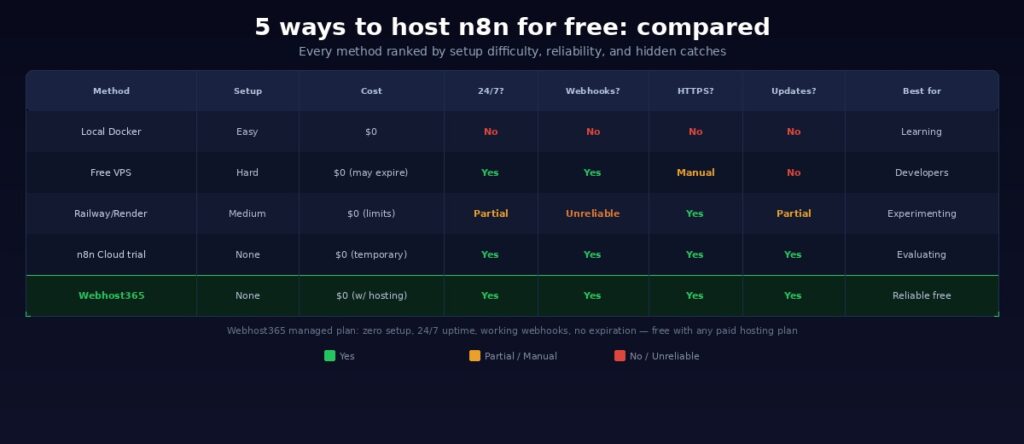
The Webhost365 managed free plan is the only option that combines zero setup difficulty, 24/7 uptime, working webhooks, automatic SSL, managed updates, and no expiration date. The 200-execution monthly limit is the trade-off, and for most lightweight automation setups, it is more than enough to get real work done.
Which Method Should You Choose?
The right method depends on two things: your technical comfort level and what you plan to do with n8n. Here is a straightforward breakdown based on who you are and what you need.
If you are a developer who is comfortable with Linux, Docker, SSH, and DNS configuration, self-hosting on a free-tier cloud VPS gives you the most control and the fewest restrictions. Oracle Cloud’s Always Free tier is the strongest option with 4 OCPUs and 24GB RAM, which is more than enough to run n8n alongside PostgreSQL and handle substantial workflow volumes. Google Cloud Platform’s Always Free e2-micro works for lighter loads and does not expire. Avoid AWS if long-term free hosting is the goal, because the 12-month expiration turns your free instance into an $8 per month bill without warning.
If you are a no-code builder, freelancer, or solopreneur who wants to automate workflows without learning server administration, managed free n8n hosting from Webhost365 removes every technical barrier. You get a running instance in minutes, webhooks work immediately, HTTPS is enabled by default, and you never think about Docker, Nginx, or SSL certificates. If you already have a website hosted on Webhost365, your free n8n instance is waiting for you right now. If you do not have a hosting plan yet, plans start at $1.49 per month and the n8n instance comes included at no extra cost.
If you just want to try n8n and see whether workflow automation fits your needs before committing to anything, run it locally with Docker. Install Docker Desktop, execute one command, and explore the n8n editor on your laptop within five minutes. Build a few test workflows, get familiar with the node system, and decide whether n8n is the tool you want to invest your time in. Once you know it is, move to a cloud-based method for production use.
If you need n8n for a team with multiple users collaborating on workflows and you want the premium experience before deciding on a long-term setup, take advantage of the n8n Cloud free trial. It gives you the best possible n8n environment with zero effort. Use the trial period to build your core workflows, evaluate whether n8n Cloud’s pricing fits your budget, and if it does not, export your workflows and import them into a Webhost365 n8n instance at a lower price point.
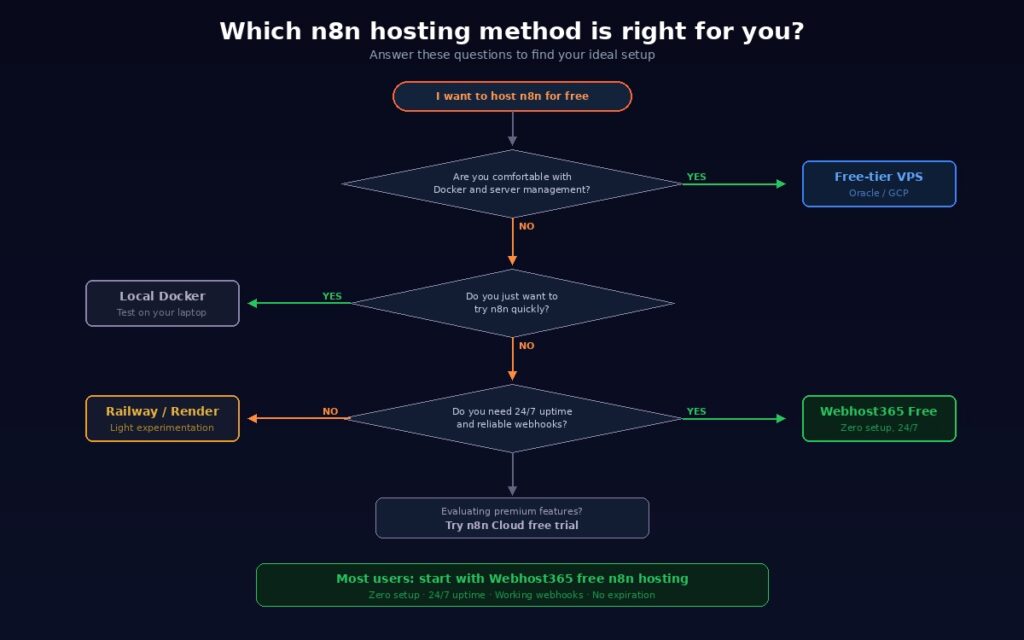
If you are building a real business on automations and need your workflows running around the clock without cold starts, sleeping instances, or expiring free tiers, start with the Webhost365 free n8n plan and run your automations within the 200 monthly execution limit. As your business grows and your automation volume increases, upgrade to a paid n8n hosting plan for higher limits while keeping the same managed, zero-maintenance infrastructure. The upgrade path is seamless, and your workflows, credentials, and settings carry over without rebuilding anything.
Common n8n Use Cases You Can Build for Free
Knowing how to host n8n is one thing. Knowing what to build with it is what makes the tool valuable. Here are six practical automations that run comfortably within the 200 monthly execution limit on the Webhost365 free n8n plan and demonstrate the kind of work n8n handles effortlessly.
Lead capture and routing. A webhook node receives form submissions from your website. n8n parses the data, adds the contact to a Google Sheet or Airtable base, sends a confirmation email through Gmail, and posts a notification to your Slack channel or Telegram group so your team knows a new lead arrived. The entire flow runs in one execution and takes under two seconds from form submission to Slack notification.
Social media content distribution. An RSS trigger monitors your blog’s feed for new posts. When you publish an article, n8n pulls the title, excerpt, and URL, formats them for each platform, and posts to Twitter, LinkedIn, and Facebook automatically. Instead of manually sharing every blog post across three platforms, one workflow handles it the moment the post goes live.
Payment and invoice tracking. A Stripe webhook fires every time a customer completes a payment. n8n receives the event, logs the transaction details in Google Sheets or Notion, sends a personalised thank-you email to the customer, and updates your CRM with the payment status. If you run a small ecommerce store or sell digital products, this workflow replaces manual bookkeeping entirely.
AI-powered email triage. An email trigger watches your inbox for new messages. n8n sends the email subject and body to an OpenAI node, which classifies the message into categories: support request, sales inquiry, partnership proposal, or spam. Based on the classification, n8n routes the email to the right team member via Slack or forwards it to a specific email address. What used to require a human scanning every incoming message now runs automatically in the background.
Client onboarding workflow. A new row appears in a Google Sheet when a client signs a contract. n8n detects the new entry, creates a project in Asana or Trello with pre-defined task templates, sends a welcome email with next steps and login credentials, generates a draft invoice in FreshBooks or Xero, and notifies your project manager in Slack. A process that used to take 30 minutes of manual setup for each new client now fires automatically the moment you add their name to a spreadsheet.
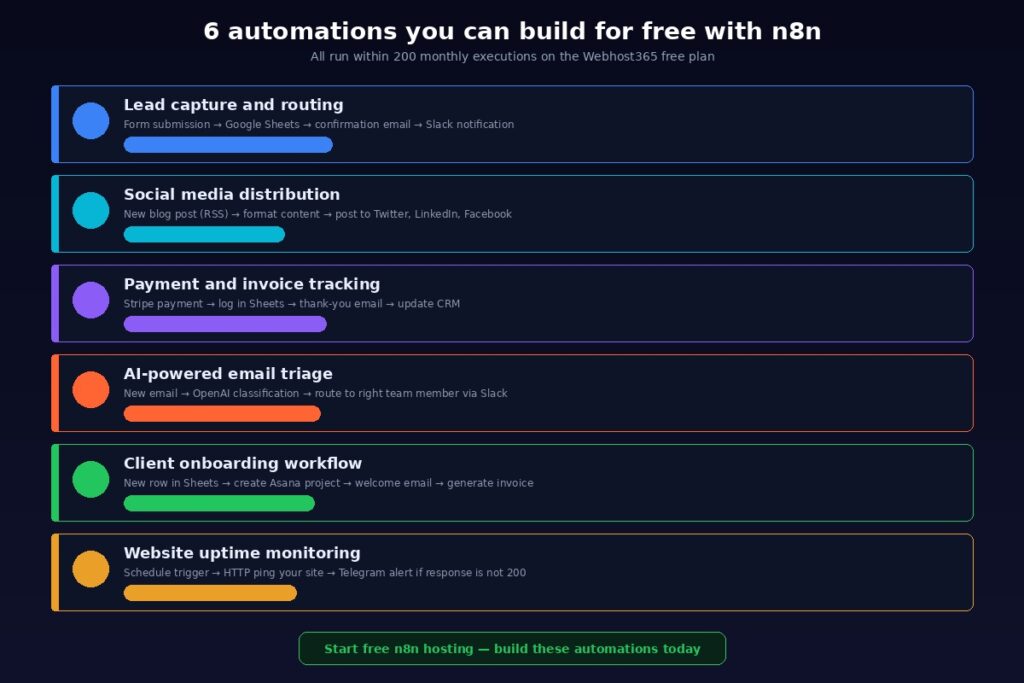
Website uptime monitoring. A schedule trigger runs every 30 minutes. n8n sends an HTTP request to your website and checks the response code. If the code is anything other than 200, n8n immediately sends an alert via Telegram, SMS through Twilio, or email so you know your site is down before your customers notice. Running every 30 minutes, this workflow uses roughly 1,440 executions per month, which exceeds the free tier. But if you reduce the check to every two hours, it fits within 200 executions comfortably and still catches downtime within a reasonable window.
All six of these automations connect to services that offer free tiers of their own: Google Sheets, Gmail, Slack, Airtable, Notion, Trello, and Telegram all have free plans. Combined with a free n8n instance, you can build a surprisingly powerful automation stack without a single recurring subscription. When your workflows outgrow the 200-execution limit, paid n8n hosting plans on Webhost365 scale with your needs without requiring you to rebuild anything.
Get Started With Free n8n Hosting Today
n8n gives you automation power that matches Zapier and Make at a fraction of the cost, and with the right hosting method, that fraction drops to zero. You can run it locally for testing, spin up a free-tier VPS if you enjoy server management, experiment with Railway or Render for light usage, or try n8n Cloud to evaluate the premium experience.
But if you want a free n8n instance that runs around the clock, handles webhooks reliably, stays updated automatically, and requires nothing more than signing up and logging in, Webhost365’s free n8n hosting is the fastest path from zero to running automations. Instant provisioning, unlimited workflows, unlimited users, HTTPS, secure credential storage, 700+ integrations, and 24/7 engineer support, all included at no extra cost for any customer on a paid hosting plan.
Already have a Webhost365 hosting account? Your free n8n instance is ready right now. Log in, request it, and start building your first workflow in the next five minutes.
Do not have a hosting account yet? Web hosting starts at $1.49 per month with Bunny CDN, free SSL, NVMe storage, and no renewal price hikes. Your n8n automation platform comes free with it. That is a website and an automation engine for less than the price of a coffee.
Start Free n8n Hosting | View Paid n8n Plans | Get Web Hosting — from $1.49/mo | Read: Managed n8n Hosting Guide
Frequently Asked Questions
Is n8n really free?
Yes, the n8n community edition is open-source software that costs nothing to use. You can download it, install it, and run unlimited workflows without paying a licensing fee. The cost comes from the infrastructure you run it on. If you self-host on your own computer, the cost is zero. If you use a cloud VPS, you pay for the server (or use a free-tier instance). n8n Cloud, the managed service run by the n8n team, starts at $24 per month. Webhost365 offers a free managed n8n plan for customers on any paid web hosting plan, which starts at $1.49 per month, making it the most affordable path to a fully managed n8n instance.
Can I use n8n without Docker?
Yes. You can install n8n directly using npm by running npx n8n in your terminal. This launches n8n locally without Docker, provided you have Node.js installed on your system. The npm method works well for quick testing and local development. However, Docker is the recommended approach for any deployment that needs to run reliably over time because it handles dependencies cleanly, makes updates straightforward, and isolates n8n from other software on your system. If you want to skip both Docker and npm entirely, a managed n8n hosting plan gives you a running instance without installing anything on your computer at all.
What is the difference between n8n Cloud and self-hosted n8n?
n8n Cloud is a fully managed service operated by the n8n team. You pay a monthly subscription and they handle the server, updates, backups, SSL, and uptime monitoring. You log in through a browser and build workflows. Self-hosted n8n means you install the software on your own infrastructure, whether that is a local machine, a VPS, or a managed hosting platform. You get full control over the environment and pay nothing for the software, but you take responsibility for keeping everything running. Managed n8n hosting from providers like Webhost365 combines the convenience of n8n Cloud with the cost advantage of self-hosting. They manage the infrastructure, updates, and security while you retain full admin access to your n8n instance at a significantly lower price point.
How many executions do I need per month?
That depends entirely on what your workflows do and how often they run. A workflow that fires once per day uses about 30 executions per month. A lead capture automation that triggers on every form submission depends on your website traffic. A monitoring workflow that checks your site every 30 minutes uses roughly 1,440 executions per month. The same workflow running every two hours uses 360. The free n8n plan on Webhost365 includes 200 executions per month. That comfortably covers most lightweight setups: a few daily scheduled workflows, moderate webhook-triggered automations, and manual executions during development. If your volume grows beyond 200, paid n8n hosting plans offer higher limits. No changes to your workflows or configuration required.
Can I migrate from self-hosted n8n to managed hosting?
Yes, and the process is straightforward. n8n lets you export individual workflows or your entire workflow library as JSON files from any instance. Download the JSON from your self-hosted setup and import it into your new managed instance. Credentials for third-party services need re-entering on the new instance for security reasons. The workflow logic, node configurations, trigger settings, and branching rules all transfer intact. If you start with a local Docker installation or a free-tier VPS and later want managed hosting, you can move your entire automation setup to a Webhost365 n8n instance. You will not rebuild a single workflow from scratch.
Is free n8n hosting reliable enough for business use?
For lightweight business automations with moderate execution volume, yes. The Webhost365 free n8n plan runs on cloud infrastructure with HTTPS, secure credential storage, and 24/7 engineer support. Your instance stays online around the clock with no cold starts and no sleeping during inactivity. Webhooks fire instantly, scheduled workflows execute on time, and your credentials stay encrypted at rest. This is a fundamentally different reliability profile from Railway or Render free tiers. Sleeping instances and credit limits on those platforms can interrupt your automations without warning. For mission-critical workflows or automations that directly impact revenue, upgrading to a paid n8n hosting plan provides higher execution limits and priority support. The free tier handles real business workflows reliably within its 200-execution limit. When you need more capacity, upgrading takes a single plan change with no disruption to your existing automations.